BlogProject Practice
Testing a Jira Integration When There Is Only a Live Jira
How we changed a live Jira to time tracking import without a Jira test system: acceptance tests with the customer, a read-only snapshot and a sandbox run.
A customer’s time tracking is fed by an import from Jira: tickets become tasks, and the bookings of the team hang on those tasks. It is a custom interface because the customer has customized Jira heavily: hierarchies are not limited to the usual chain of sub-task, task and epic, they can be arbitrary. The time tracking system in this case is time cockpit, our own product for time tracking and project controlling.
The import had to change. A custom field on the epic decides where a task belongs, tasks move between epics, and issue types change. The customer wanted that reflected correctly, and without losing a single booking.
The catch is a common one. We had a sandbox for the time tracking side, a copy of production. We had no Jira test system, only the one live Jira that the whole company works in. You cannot try “move this task to another epic” there and see what happens to the import.
This article describes how we closed that gap. The method has four steps: agree on the test cases with the customer, turn them into automated tests that never write to Jira, make the test results readable for the customer, and finally run the old and the new import against a copy of production. The last step is where our assumptions broke, and that is exactly why it is worth doing.
The problem: one live system, no safe place to experiment
An integration has two sides, and they rarely have the same test situation:
- The time tracking side can be cloned. A sandbox with a copy of the production data is cheap, and nothing you do there reaches real users.
- The Jira side is usually the company’s live Jira. Creating test tickets in it is possible but intrusive, and any import that writes back (status, links, estimates) could damage real work.
So the question is not “how do we test the import”, but “how do we test the import without Jira being able to suffer, and without fooling ourselves with mocks”.
Step 1: Agree on the test cases with the customer first
Before we wrote any test, we asked the customer which situations the change has to handle. They sent us a list of about a dozen scenarios in a Word document. Typical entries were “a custom field changes on the epic”, “a task is moved to another epic” and “the issue type changes”.
Two things made this list valuable:
- It is the customer’s definition of correct. If we invent the cases ourselves, we test what we thought of. The customer knows which edge cases happen in daily work.
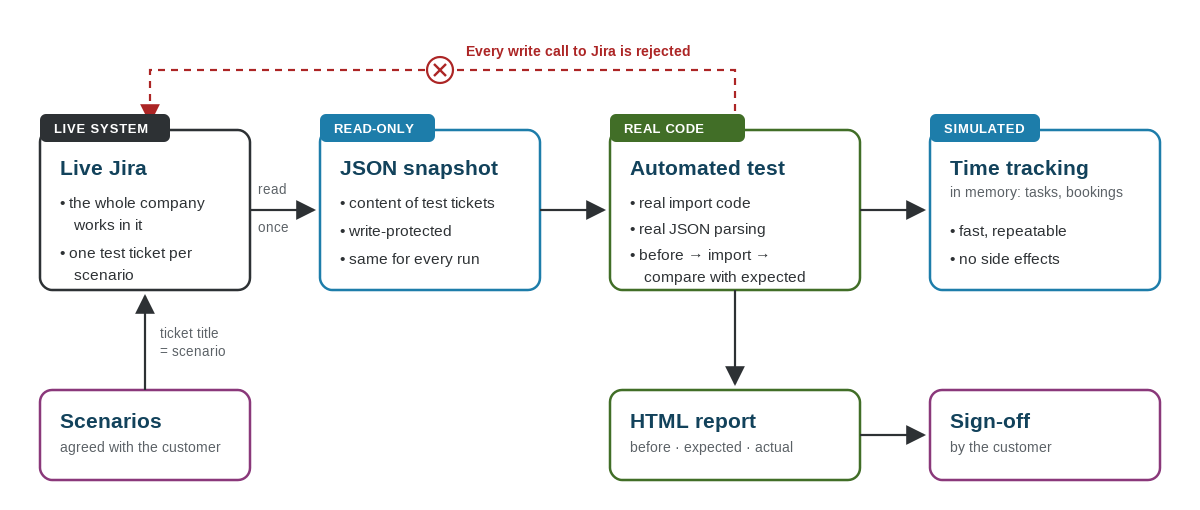
- It became the backbone of everything else. Each scenario got its own test ticket in Jira, and the title of each ticket mirrors its scenario. Anyone who opens Jira sees at a glance which case a ticket stands for.
Creating a handful of clearly labelled test tickets is a small intrusion. Everything after that point works on a copy of their content.
Step 2: Turn the scenarios into automated tests
The tests have to prove more than “the code compiles against a mock”. Our rules for the test setup:
- Real import code, real JSON parsing. The test runs the same code path as production, including the parsing of the Jira response.
- Jira is only read. The test data is a read-only JSON snapshot of the test tickets, taken once from the live Jira. The test harness rejects every write call to Jira, so a test cannot damage anything, even by accident.
- The time tracking system is simulated in memory. Tasks and bookings live in an in-memory model, so a test runs fast, repeatably and without side effects.
This is a compromise on purpose. Parsing a real Jira response is where many integrations break, so we do not fake that. Writing to a live system is where the damage can happen, so we forbid it. What the in-memory model cannot show us is how the real system reacts. We keep that for step 4.
For each scenario, the test describes a start state (tasks and bookings before the import), runs the import, and compares the result with the expectation the customer agreed to.
Step 3: Make the tests readable for the customer, and have them signed off
Green checkmarks in a test runner mean nothing to the person who has to accept the change. So we generate an HTML report from the test run. It contains one block per scenario, and per task and per booking three columns: before, expected, actual.
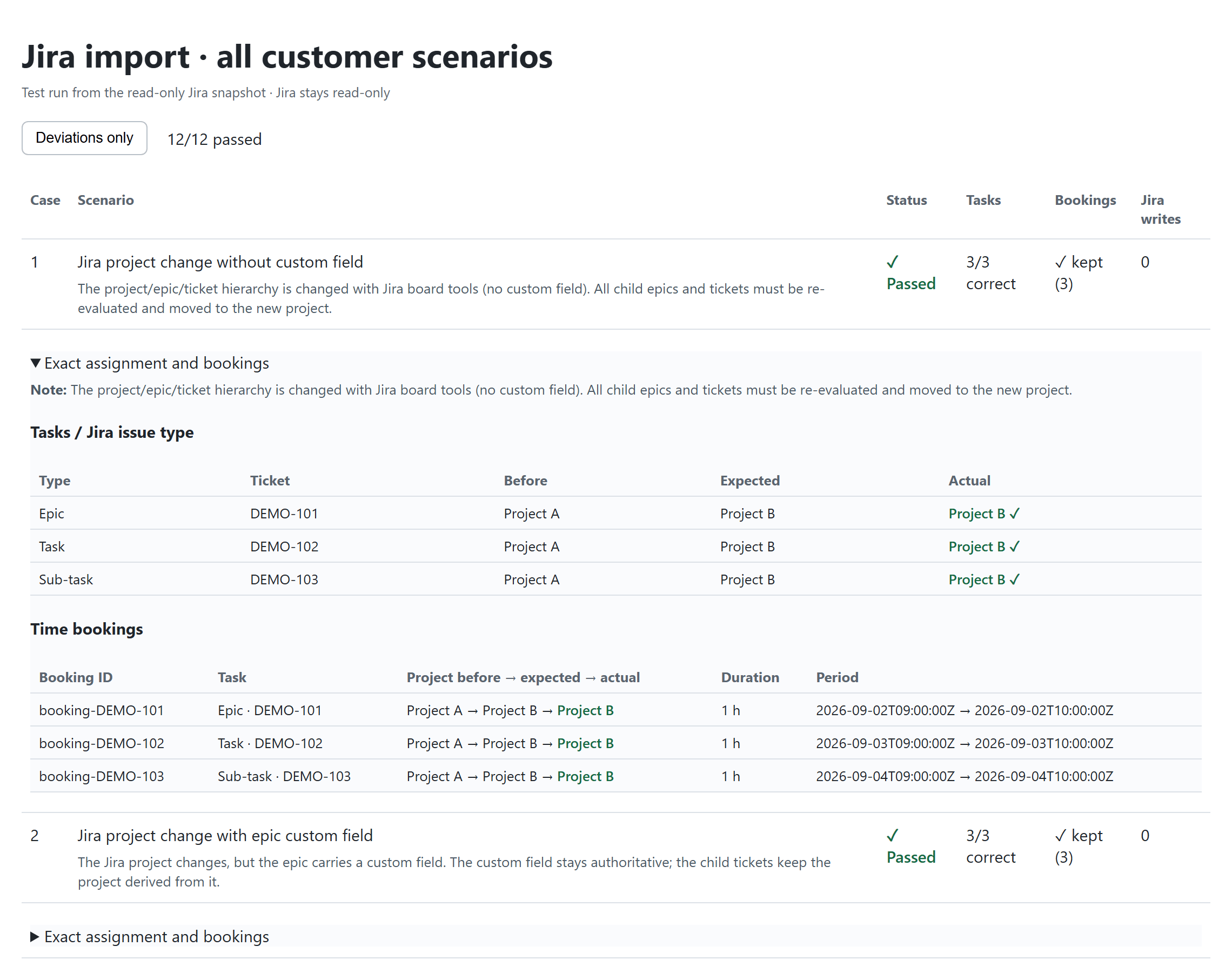
A project controller can read this without knowing the code:
- “Scenario: task moved to another epic. Before: the bookings sit on project A. Expected: they are now on project B. Actual: they are now on project B.”
- Differences are highlighted, so a failing scenario is obvious.
We treat this report as a test playbook and ask the customer to sign it off before we go further. The point is the order. The customer has agreed on the cases (step 1) and now confirms that our tests express them correctly. Disagreements surface here, in a document, and not after the go-live in the time sheets of the team.
Step 4: Verify against reality with a sandbox run
Tests with mocks answer the question “does the code do what we think”. They cannot answer “does it do the right thing with real data”. For that we ran the import locally against a time tracking sandbox, a copy of production, with two safeguards:
- The live Jira is accessed read-only.
- The export back to Jira is switched off.
We ran the old import first and then the new one on the same data, and compared the results. Two tools made this fast:
- Read-only snapshots before and after. We captured the relevant tasks and bookings before and after each run and compared them.
- An AI assistant with read-only access to the sandbox. time cockpit offers an MCP server (Model Context Protocol, a standard that lets an AI assistant call tools) that can run read-only TCQL queries, TCQL being the query language of the product. With it we compared every booking field by field, checked that only the intended field had changed, and compared the result with an expectation that we computed independently from a dump of the Jira state. The independence matters: if the expectation came from the same code as the result, it would only confirm itself.
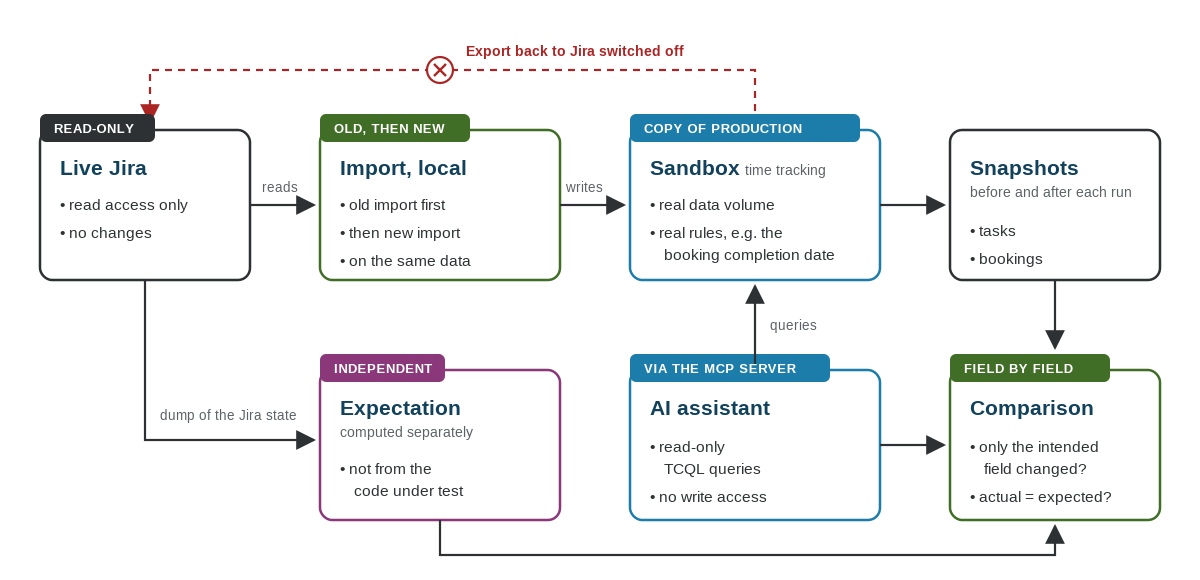
“Only the intended field changed” is the check that finds the most. A change that moves a task to the right place and quietly changes something else is exactly what a scenario-based test does not see.
What real data shows that mocks hide
The sandbox run found things that no unit test would have. Without numbers, because they depend on the customer, these were the kinds of finding:
- A full reload that was fine in tests hit the function timeout. With a handful of test tickets, a complete import is instant. With the real amount of data, it ran into the time limit of the serverless function. Tests with small data cannot show scaling limits. The fix was to load the data with a few bulk queries instead of one request per ticket.
- The booking completion date makes old bookings immovable. In time tracking, closed months are locked by a booking completion date. A booking that belongs to a task that has moved to another epic cannot simply be moved along when its month is closed. This is not a technical problem. It is a business question: should closed months be reopened, should old bookings stay where they are, or is there a different rule? We could only ask the customer because we saw it happen with real data.
The lesson: a sandbox run turns assumptions into questions that you can put to the customer before the go-live, while there is still time to decide, instead of after it.
When this is not enough
- The snapshot is a snapshot. If Jira changes how it delivers a field, the read-only JSON no longer matches. Refresh it when the interface to Jira changes.
- The in-memory model is not the real system. Triggers, validation rules and permissions of the time tracking system only show up in the sandbox run. Do not skip step 4 because the tests are green.
- A sandbox with production data is sensitive. Treat it like production for access, and keep any export to Jira switched off.
- The sign-off costs the customer time. Keep the report short and per scenario, so reviewing it is a matter of minutes per case.
Where we use this
We use this approach when we change integrations between Jira and time cockpit. For this kind of work two properties of the product help: a sandbox that can be created as a copy of production, and the MCP server. Together they let an AI agent run the corresponding checks itself: with real data, but not in the live system. The method itself does not depend on them. Any system with a copyable test environment and a way to read its data can be verified this way.
Takeaways: a checklist for testing an integration without a test system
- Ask the customer for their scenarios first, in their words, and mirror each scenario in the title of one test ticket.
- Let the automated tests use the real import code and real JSON parsing, but only read from the live system, and make the harness reject any write.
- Simulate the target system in memory for fast, repeatable tests.
- Produce a report per scenario with before, expected and actual per task and booking, and have the customer sign it off.
- Run old and new import against a sandbox copy of production, with the live source read-only and the export back switched off.
- Compare the result field by field, check that only the intended field changed, and compute the expectation independently of the code under test.
- Expect findings that mocks hide: scaling limits and locked periods. Turn each into a question for the customer before go-live.
If you have to change a Jira integration that you cannot test in a copy of Jira, let’s talk about yours.
